Creating a Project
Projects define delivery scope. Every site, survey, and report should live in the right project from day one.
Use a new project when:
- You have a new program phase or funding cycle (for example: “2026 Baseline” vs “2027 Repeat”)
- Governance differs (privacy, FPIC/data sovereignty terms, benefit sharing, claim stages)
- Reporting audiences differ (internal ops vs disclosure vs investors/regulators)
- You need clean separation between pilots and production programs
Build the project record
- Open
Projectsand chooseCreate project. - Complete the wizard steps (exact steps depend on your organisation tier).
- Save and open the project dashboard.
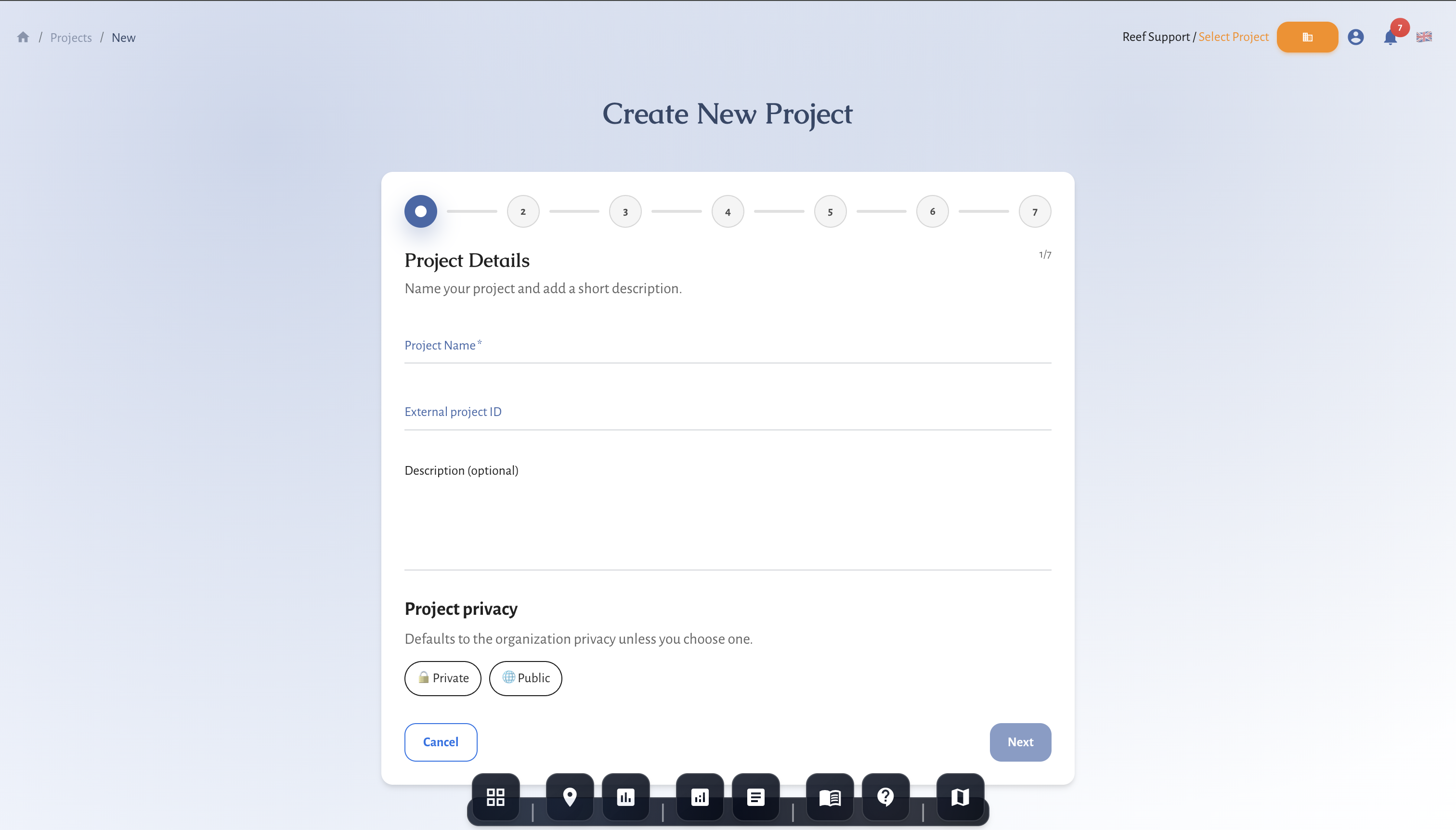
Wizard steps (what each step means)
1) Project details (always available)
Core identifiers and privacy.
- Project name (required): human-readable name shown in selectors and reports.
- External project ID (optional): internal registry ID, grant ID, or cross-system reference.
- Description (optional): what the project is doing and why.
- Project privacy: defaults to the organisation privacy baseline unless you choose one.
Notes on privacy:
- If your organisation is private, project privacy is typically locked to Private.
- Privacy affects what collaborators can see and how data can be shared.
2) Outcomes & reporting (always available)
Defines what the project is for and who you report to.
- Project focus: the primary delivery focus (for example: monitoring, restoration, MRV, etc).
- Outcome domains: what you expect to report on (biodiversity, climate, livelihoods, etc).
- Blue economy sector (optional): aligns the project to a sector taxonomy.
- Reporting audience (optional): who will consume outputs (funders, regulators, partners, internal).
Advanced steps (Professional tier)
If your organisation is on the Professional tier, you will also see advanced steps used for MRV and disclosure workflows. These are optional, but strongly recommended for projects that will be used for claims, finance, or formal reporting.
3) Integrity & claims
Defines how outcomes are interpreted and what you can claim.
- Outcome type: uplift, avoided loss, or maintenance.
- Crediting intent (optional): disclosure only vs credit pathway.
- Credit use case (optional): disclosure, contribution, compensation.
- Mitigation hierarchy stage (optional): avoid, reduce, restore, regenerate, transform.
- Verification status: track validation/verification status.
- Claim stage: prevents premature claims; only claim verified outcomes when eligible.
- Leakage risk / basis / buffer (%): record leakage context and any buffer applied.
- Durability mechanisms: how outcomes are expected to persist over time.
- Protection status / management standard / long-term financing mechanism: governance signals for durability and integrity.
4) Rights & data sharing
Defines consent, sovereignty, and benefit/grievance context.
- Data sharing agreement status: required/signed/in progress, etc.
- Data sovereignty status: whether FPIC, customary tenure, or sovereignty considerations apply.
- Benefit sharing mechanisms: mechanisms in place for equitable benefit sharing.
- Grievance mechanism: primary grievance channel/mechanism.
- Community participation level: level of community involvement in design and delivery.
5) Disclosure & finance readiness
Maps the project to disclosure frameworks and finance readiness metadata.
- TNFD dependencies / impacts / risks: tag the project for TNFD-aligned reporting.
- ESRS disclosure references: tag for ESRS E3/E4 alignment where relevant.
- DNSH checklist: EU Taxonomy “Do No Significant Harm” screening flags.
- Milestones: stage tracking for delivery and readiness.
- Evidence sources: what types of evidence exist for the project (for example: field data, satellite, third-party audits).
- Verification stage + review status: internal workflow signals for readiness.
6) Funding
Optional, but useful for governance and portfolio reporting.
- Funding type: overall funding model.
- Funders: name, type, amount, currency, year (track major funders and amounts).
7) Review
Final confirmation before creating the project.
Project setup standards
- Name projects with place and cycle year
- Keep one clear objective per project
- Separate pilot and production programs
- Confirm data visibility rules with partners
- Decide baseline vs repeat cadence early and document it in the description
- Use the Metrics reference when deciding what to report